
Quick Answer
SaaS teams confuse activity with progress when they measure what people do instead of what moves revenue forward. Calls, emails, meetings, and tasks show effort. They do not always show meaningful movement toward revenue.
That distinction matters.
A busy team can still have a stalled pipeline.
Activity Looks Like Progress
Activity is easy to measure.
You can count:
- calls made
- emails sent
- meetings booked
- tasks completed
- leads contacted
Those numbers create a sense of momentum.
However, activity only tells you what happened.
It does not tell you whether buyers moved closer to a decision.
That is where many SaaS teams lose visibility.
1. More Activity Can Hide a Stalled Pipeline
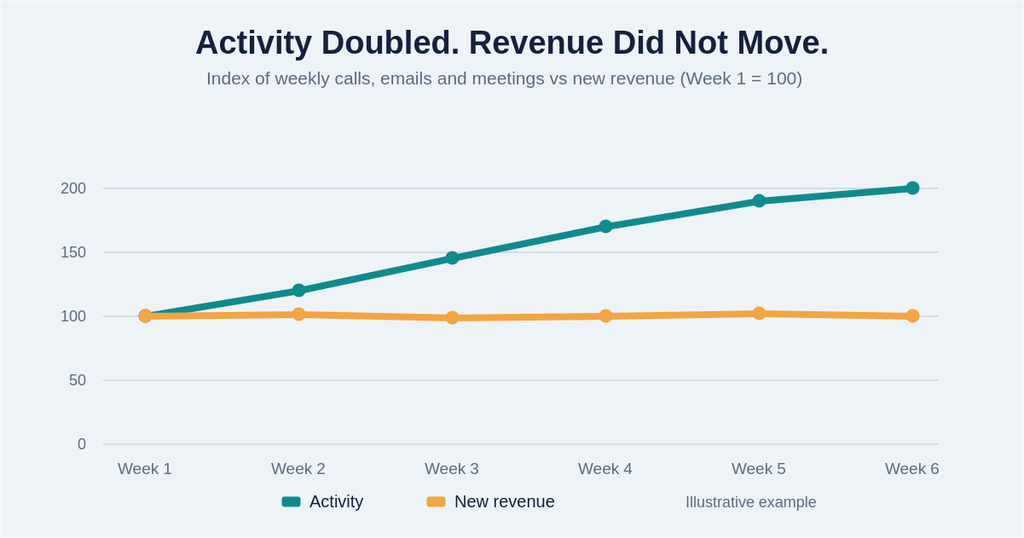
Imagine your team doubles its outreach.
Calls increase.
Emails increase.
Meetings increase.
Yet revenue stays flat.
That should raise a question.
The problem may not be effort.
The problem may be what happens after the activity.
If opportunities do not progress, more activity will not solve the underlying issue.
2. Meetings Are Not the Same as Progress
Meetings are useful.
However, a booked meeting does not automatically create revenue.
Ask what happened after the meeting.
Did the buyer:
- move to the next stage?
- confirm a business problem?
- involve another decision-maker?
- agree to a specific next step?
- move closer to a purchase?
If not, the meeting may represent activity without meaningful progress.
3. A Full Pipeline Can Still Be Weak
Pipeline volume can also create false confidence.
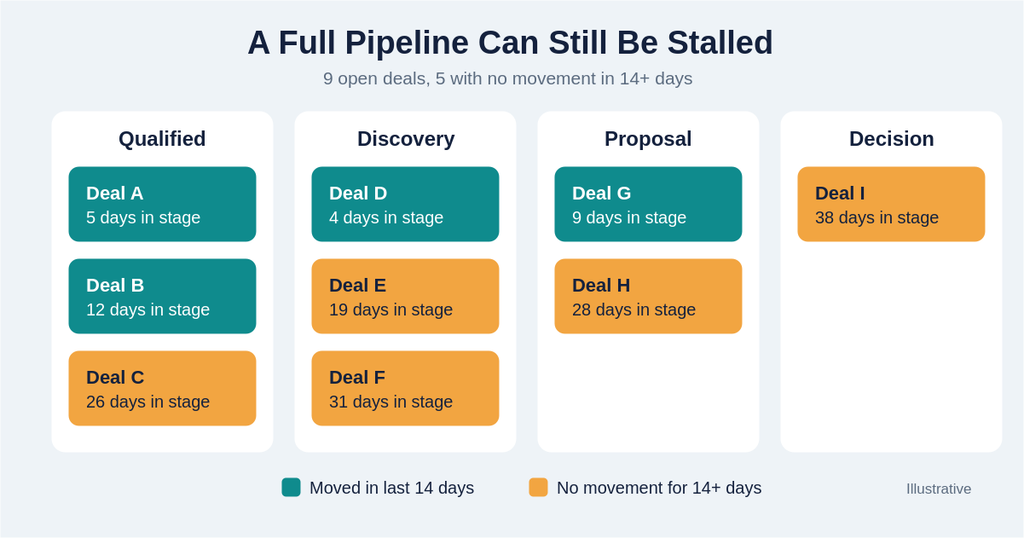
A CRM may show dozens of open opportunities.
That looks positive.
But open opportunities do not necessarily represent active buying decisions.
Some may have no recent engagement.
Others may lack a clear next step.
Some may have remained in the same stage for weeks.
Therefore, pipeline size alone cannot tell you whether revenue is moving.
4. CRM Dashboards Often Reinforce the Problem
This is where system design becomes important.
If your CRM dashboard prioritizes activity metrics, teams naturally focus on those metrics.
The system starts rewarding what is easiest to measure.
As a result, people optimize for:
- more calls
- more emails
- more meetings
- more tasks
Meanwhile, the business needs answers about:
- conversion
- pipeline movement
- sales cycle
- deal progression
- revenue
The dashboard shapes attention.
That means dashboard design can influence behavior.
This is why I wrote How to Build Dashboards That Show Truth, Not Activity.
5. Teams Start Optimizing for the Wrong Outcome
Once activity becomes the primary measurement, behavior follows.
A salesperson may prioritize completing another task.
A manager may push for more calls.
Leadership may celebrate higher activity numbers.
Yet nobody asks whether those actions produced better revenue outcomes.
That creates a dangerous loop.
The team becomes more productive at doing work.
It does not necessarily become more effective at generating revenue.
6. Progress Requires Context
Real progress depends on where the buyer is in the journey.
For example, moving from:
Qualified → Discovery
is different from:
Proposal → Decision
The second movement may carry much greater revenue significance.
Therefore, teams need metrics that reflect buyer progression.
Useful indicators include:
- stage-to-stage conversion
- time in stage
- next-step completion
- opportunity velocity
- win rate
- sales cycle length
- revenue generated
These metrics tell a different story from raw activity.
What Progress Actually Looks Like
Progress means something changed in a way that improves the probability of revenue.
That could mean:
- a buyer confirmed a problem
- a decision-maker joined the process
- an opportunity advanced
- a proposal received a response
- a commercial decision was scheduled
- a stalled deal became active again
The exact signal depends on your sales process.
The principle stays the same.
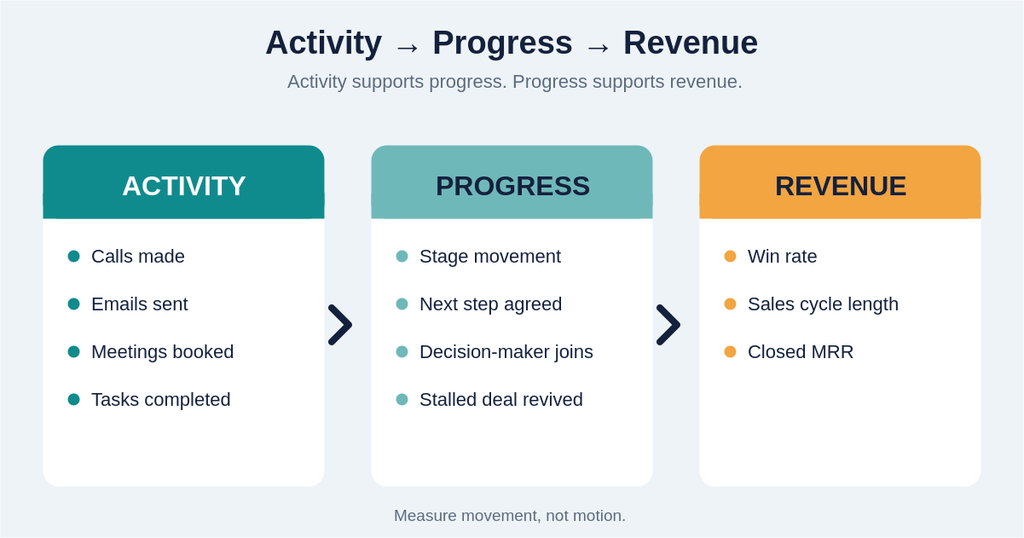
Measure movement, not motion.
How to Stop Measuring Activity as Progress
Step 1: Separate Activity From Outcomes
Create two categories.
Activity:
- calls
- emails
- meetings
- tasks
Progress:
- qualified opportunities
- stage movement
- conversion
- revenue
- buyer commitments
This immediately creates better visibility.
Step 2: Identify Your Critical Revenue Movements
Map the stages that matter most.
Then determine what meaningful progression looks like at each stage.
Do not assume every movement has equal value.
Step 3: Measure Time Between Stages
A deal that moves quickly is different from one that sits for weeks.
Track how long opportunities remain in each stage.
This can expose bottlenecks that activity metrics completely miss.
Step 4: Connect CRM Reporting to Revenue
Your dashboards should help answer business questions.
For example:
- Where are opportunities slowing?
- Which stages convert?
- Where are deals being lost?
- How long does revenue take to move?
- Which activities correlate with actual progression?
Now the CRM becomes a decision system.
It stops being an activity tracker.
Step 5: Change What the Team Reviews
Metrics influence behavior.
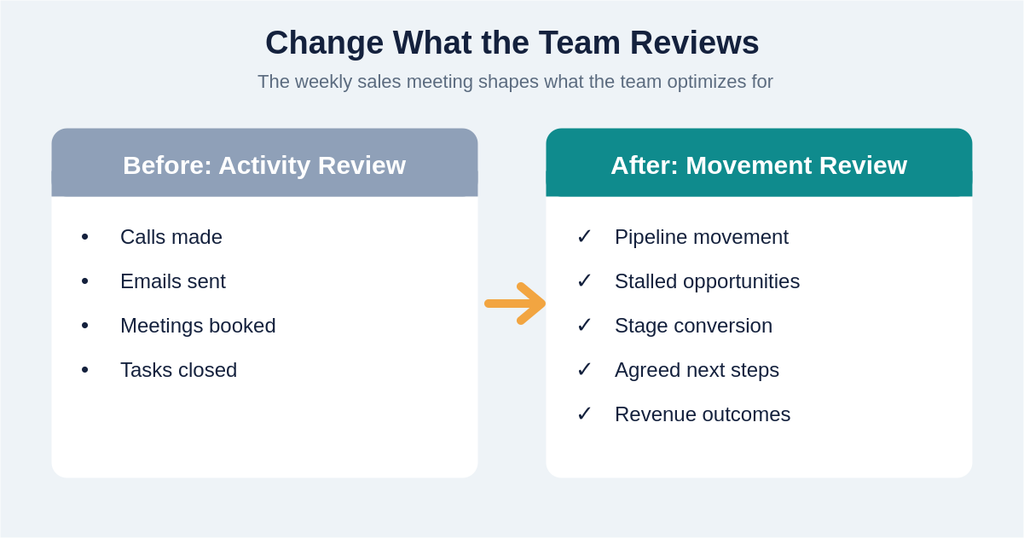
If your weekly sales meeting focuses entirely on calls and emails, the team will optimize for calls and emails.
Instead, discuss:
- pipeline movement
- stalled opportunities
- conversion
- next steps
- revenue outcomes
That shifts attention toward progress.
The Goal Is Not Less Activity
This distinction matters.
Activity is not bad.
Calls matter.
Emails matter.
Meetings matter.
The problem starts when activity becomes the definition of success.
Activity should support progress.
Progress should support revenue.
That creates a much healthier hierarchy:
Activity → Progress → Revenue
When those three connect, teams gain much better visibility into performance.
What Revenue-Efficient Teams Measure
A revenue-efficient SaaS team does not ignore activity.
It puts activity into context.
Instead of asking only:
“How much did the team do?”
leaders also ask:
“What changed because of what the team did?”
That second question is much more valuable.
It reveals whether the system is converting effort into revenue movement.
Check Your Revenue Efficiency
If your team is highly active but revenue is not moving at the same pace, don’t immediately assume you need more activity.
First, check the efficiency of the system behind that activity.
Look at:
- how quickly opportunities progress
- where deals stall
- which stages convert
- how much manual work slows the team
- whether your CRM shows revenue movement clearly
A busy team is not necessarily an efficient team.
Check Your Revenue Efficiency to understand whether your current system is turning activity into meaningful revenue progress.
Key Takeaways
- Activity measures effort.
- Progress measures meaningful movement.
- Revenue measures the business outcome.
- More calls and meetings do not guarantee more revenue.
- Pipeline size does not always reflect pipeline health.
- CRM dashboards can reinforce the wrong behaviors.
- Teams should measure movement through the buyer journey.
- Revenue efficiency depends on connecting activity to outcomes.